Weak RTK positioning is usually easier to fix once you separate the problem into three parts:
the mower’s satellite reception, the RTK reference station’s reception, and the correction-data connection between them.
The best approach is to improve those one at a time instead of moving everything at once.
Quick answer: improve RTK signal in this order
- Test the mower in an open-sky area.
- Check whether the mower or the RTK station has the weaker signal.
- Improve the reference station’s view of the sky if needed.
- Check trees, buildings, fences, and metal objects around the installation.
- Verify the correction-data connection.
- Check charging-station/docking-point placement.
- Update firmware and restart only after the physical setup is checked.
- Avoid moving the RTK station unless you know whether remapping will be required.
If the mower loses signal mainly under trees or beside buildings, start with our more specific guide:
Robot Mower Loses Signal Under Trees? What Actually Helps
If the problem occurs across most of the yard, use:
Robot Mower Losing RTK or GPS Signal? How to Find the Cause
First, identify which signal is weak
Before changing anything, find out whether the problem is:
- the mower’s own satellite reception
- the local RTK reference station
- the correction-data connection
- or a combination of them
That distinction matters.
Mammotion’s positioning diagnostics, for example, separate satellite reception at the mower, satellite reception at the RTK station, satellites visible to both, and the connection between the two.
A mower can therefore have good satellite reception while the RTK station is poorly positioned—or the opposite.
1. Start with an open-sky test
This should be your first test because it tells you whether the problem is local or system-wide.
Test
Move the mower into a wide, open section of lawn.
Avoid:
- tree canopy
- tall walls
- sheds
- narrow passages
- overhangs
- tall fences
Wait until the mower reports normal or improved positioning.
What the result means
If positioning improves quickly, the mower is probably being affected by a particular part of the yard.
If positioning remains poor in open sky, look more closely at:
- the RTK station
- correction data
- firmware
- hardware
- system configuration
Do not start relocating the base station before doing this simple test.
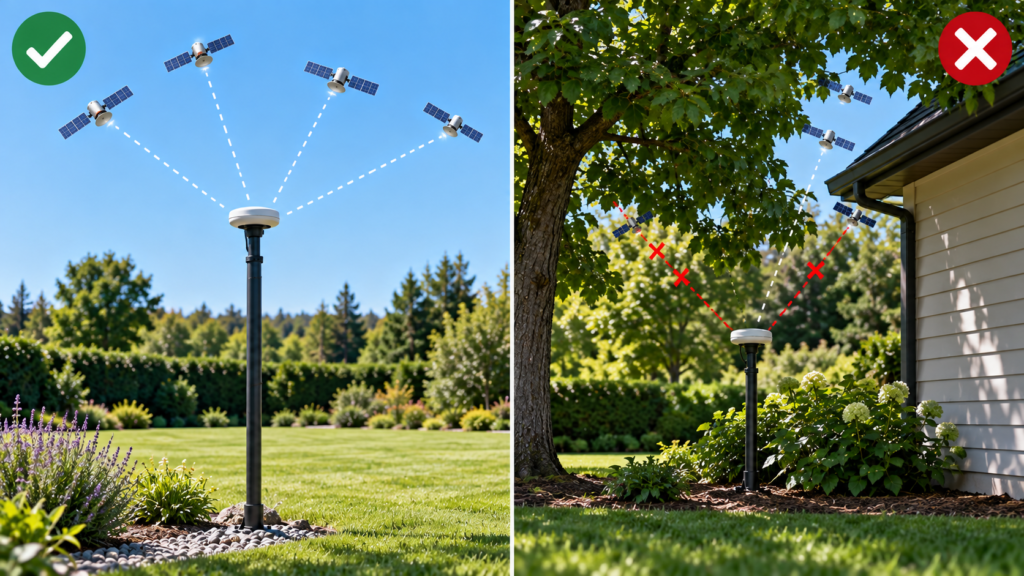
2. Give the RTK reference station a better view of the sky
A poorly positioned reference station can weaken the entire RTK setup.
Test
Look at the sky from the station itself.
Ask:
- Is it under a tree?
- Is part of the sky blocked by the house?
- Is it mounted below a wall or roofline?
- Is it close to tall fencing?
- Is it beside a large metal structure?
- Is the mounting position stable?
Solution
Move the station only if its own sky visibility is poor.
Current Husqvarna EPOS guidance for applicable local reference stations calls for at least a 135° clear sky view, mounting at least 6.5 ft (2 m) high, and keeping the mower within the specified communication range.
Current Navimow guidance for applicable RTK installations recommends more than a 110° unobstructed view of the sky and keeping the antenna at least 6.6 ft from walls, dense trees, houses, and fencing.
Mammotion uses different installation guidance, including keeping its reference station away from walls, roofs, trees, large glass walls, and large metal objects.
The important rule is:
Use the placement requirements for your exact mower system.
Do not copy one brand’s distances into another installation.
3. Mount the RTK station firmly and correctly
Signal quality is not only about where the station is—it also needs a stable installation.
Test
Check whether the station:
- moves in the wind
- leans noticeably
- is loosely attached
- has been bumped or shifted
- is mounted on an unstable pole
Solution
Re-secure the mount according to the manufacturer’s instructions.
Mammotion specifically advises that its RTK reference station should be installed straight.
A reference station is supposed to represent a stable known position, so unnecessary movement is something to avoid.
4. Separate mower reception from base-station reception
This is one of the most useful diagnostic habits.
Imagine:
RTK station: excellent sky view
Mower: underneath dense tree canopy
The station may be working perfectly.
The mower may still struggle.
Test
If your app provides separate signal information, compare both.
If:
Station good + mower poor
focus on the mower’s surroundings.
If:
Station poor + mower good
improve the station installation.
If:
Both poor
you may have multiple obstruction problems.
This is why moving the RTK station is not a universal fix.
5. Remove or work around local satellite obstructions
The next step is to inspect where the mower actually loses positioning.
Common problem areas include:
- underneath mature trees
- beside the house
- next to a tall privacy fence
- between two buildings
- narrow side yards
- under decks or overhangs
Dense trees and buildings are explicitly listed by both Husqvarna and Navimow as potential causes of weak satellite reception.
Solution
Where practical:
- move a virtual boundary farther into open lawn
- widen a narrow navigation corridor
- create a small stay-out/no-go area
- adjust a route away from the deepest canopy
- avoid forcing the mower into a satellite dead spot
Do not redesign the whole lawn because of one small weak area.
A minor boundary change may be enough.
6. Check for metal and reflective objects near the installation
Metal can matter around some robot-mower installations.
Husqvarna currently warns that metal objects, including metal fences, may interfere with reference-station communication or charging-station signals.
Mammotion also recommends distance from large metal objects and large glass surfaces around its reference station.
Check for
- metal fencing
- sheet-metal sheds
- large metal panels
- large glass walls
- reinforced structures
- coiled cables near the station
If the system works poorly only beside one of these objects, test the station or mower farther away before permanently changing the installation.
7. Check the correction-data connection
Strong satellite reception alone is not enough for RTK positioning.
The mower also needs correction information.
Depending on the product, that may come from:
- a local RTK reference station
- Network RTK
- cloud/network infrastructure
Test
Look in the app for statuses such as:
- RTK connected
- reference station connected
- correction data
- NRTK
- Network RTK
- cellular connection
If the mower has good satellite reception but cannot maintain RTK positioning, this connection deserves attention.
Navimow explicitly distinguishes weak GPS reception from internet-related Network RTK problems: weak Wi-Fi or 4G does not directly weaken GPS signals, but connectivity can affect receipt of correction data.
Solution
For local RTK:
- verify station power
- inspect antenna/reference-station cables if the model uses them
- confirm pairing
- inspect connection status
- restart the mower and station if the manufacturer recommends it
Husqvarna’s current troubleshooting guidance recommends checking station power and restarting both mower and reference station for reference-station communication problems.
For Network RTK:
- check coverage
- verify cellular/internet access
- check account/service state
- check the manufacturer’s service status if available
8. Improve charging-station and docking-point placement
Sometimes the RTK system works across the lawn but fails near the charging station.
That can create symptoms such as:
- difficulty leaving the dock
- trouble returning home
- failed docking-point setup
- positioning errors near the station
Test
Observe whether the mower works normally once it moves into open lawn.
If yes, the dock area itself may be the problem.
Solution
Follow the manufacturer’s placement rules.
For current Husqvarna EPOS installations, the docking point should have a clear view of the sky, with at least 20 ft of free space in front of the charging station for applicable systems.
Navimow also recommends open-sky placement for the charging station and publishes specific clearance requirements for applicable RTK systems.
Do not assume that a physically convenient spot beside the house is automatically a good navigation location.
9. Check the antenna/reference-station cable
This only applies to systems that use a wired connection between antenna/reference hardware and the charging station or other components.
Test
Inspect the cable for:
- cuts
- pinching
- loose connectors
- corrosion
- dirt
- damage from pets or lawn equipment
Navimow specifically recommends inspecting its antenna cable and extension connections when troubleshooting weak positioning.
Solution
Reconnect or replace damaged components according to the manufacturer’s instructions.
Do not splice sealed outdoor cables unless the manufacturer specifically supports that repair.
10. Check firmware after the physical installation
Firmware can matter, but it should not be the first explanation for a mower that fails underneath the same tree every day.
Test
Ask:
Did the problem appear suddenly even though nothing in the yard changed?
If yes:
- check app warnings
- check firmware
- restart the mower
- restart the app
- restart the reference station if applicable
Navimow currently recommends checking firmware as part of its RTK/GPS troubleshooting process.
Solution
Install manufacturer-supported updates and retest the same location.
If the mower still fails only beside the same physical obstruction, return to the yard/environment diagnosis.
11. Do not move the RTK station casually
This deserves its own warning.
On some systems, the map is tied to the physical position of the reference station.
Moving it can mean recreating work areas and virtual boundaries.
Husqvarna currently states that relocating an EPOS reference station to a new position can require a new EPOS installation and recreation of work areas, stay-out zones, and transport paths.
So before relocating anything:
- confirm the station actually has poor reception
- read the model-specific relocation instructions
- export or document your existing setup if possible
- understand whether remapping will be necessary
Do not move the station “just to see if it helps.”
12. Use manufacturer fallback features where available
A weak satellite area does not always require moving hardware.
Some systems offer another way to cross or mow difficult zones.
For example, compatible Husqvarna EPOS systems can use Support by Wire in selected weak-satellite areas. Husqvarna says the support wire should extend beyond the problem area so the mower can reconnect to satellite positioning.
Other mower platforms may combine RTK with:
- cameras
- VSLAM
- VIO
- LiDAR
- inertial navigation
- odometry
Current Navimow X3 systems, for example, combine RTK with VSLAM and VIO for navigation in more challenging environments.
The practical lesson is:
Check what your mower can do after RTK becomes weak.
That can matter more than the RTK specification itself.
What usually helps—and what usually doesn’t
| Situation | Most useful action |
|---|---|
| Reference station under trees | Improve station sky view |
| Mower fails only under one tree | Adjust boundary or use fallback navigation |
| Signal poor everywhere | Check station + correction connection |
| Strong GPS but no RTK | Check correction-data connection |
| Dock is beside house/tree | Improve docking-point location |
| Problem started after hardware move | Verify installation/remapping requirements |
| Network RTK drops | Check coverage/connectivity |
| One narrow shaded corridor fails | Consider fallback navigation or route changes |
| Large parts of yard have poor sky view | Consider whether RTK-first navigation fits the yard |
Things that do not automatically improve RTK
A stronger Wi-Fi router
This may help Network RTK or app connectivity, but it does not remove a tree blocking satellites.
Moving the RTK station when its signal is already good
If the mower itself is underneath dense canopy, moving a perfectly functioning station may not help.
Raising the station as high as possible
Higher can help in some installations, but only within the manufacturer’s mounting requirements and safe installation practices.
Constantly remapping
If the environment causes the signal loss, repeatedly recreating the map does not remove the obstruction.
Buying an “RTK booster”
Be cautious with third-party products making vague claims about boosting RTK reception.
Robot-mower positioning systems are integrated systems. Use supported accessories and manufacturer guidance.
When setup changes are no longer enough
A few weak spots are normal troubleshooting territory.
But suppose your yard contains:
- dense mature canopy over a large percentage of the lawn
- tall buildings close to several mowing areas
- long obstructed passages
- disconnected shaded zones
- repeated signal loss despite a correctly installed RTK station
At that point, improving the RTK signal may no longer be the right objective.
The more important question becomes:
Is an RTK-first mower the right navigation technology for this yard?
That is why our next technology article will compare:
RTK vs LiDAR vs Vision Robot Mowers
and why our first buying guide will eventually focus on:
Best Robot Lawn Mowers for Yards With Trees
We should only recommend replacement after the fixable installation issues have been ruled out.
FAQ
How can I make my robot mower RTK signal stronger?
Start by checking the mower and reference station separately. Improve the reference station’s sky visibility if its reception is poor, reduce local obstructions around problem mowing areas, verify the correction-data connection, and check charging-station placement.
Should an RTK base station be mounted high?
Often yes, but the required height differs by system.
Current Husqvarna local EPOS guidance calls for at least 6.5 ft for applicable reference stations. Other manufacturers publish their own requirements.
Use your mower’s official installation instructions rather than a universal height.
Can I put the RTK station beside my house?
Possibly, but only if it still satisfies the manufacturer’s required sky visibility and clearance.
Buildings can obstruct satellite reception, so a convenient wall location is not always a good positioning location.
Can trees affect the RTK base station?
Yes.
Trees can degrade satellite visibility at the station itself as well as at the mower. Both should be diagnosed separately.
Does better Wi-Fi improve RTK?
Not directly for local satellite reception.
However, Network RTK may depend on connectivity to receive correction data, so poor internet or cellular service can affect those systems.
Should I move my RTK base station?
Only after confirming that the station itself has poor placement or reception.
Some systems may require remapping when the reference station moves.
Final checklist
To improve robot mower RTK reliability:
- Test the mower in open sky
- Compare mower and reference-station signal quality
- Give the RTK station a clear sky view
- Check the station mount is stable
- Keep it away from major obstructions according to manufacturer guidance
- Inspect trees and buildings around failure areas
- Check correction-data connectivity
- Inspect antenna/reference-station cables where applicable
- Check charging-station and docking-point placement
- Update firmware
- Use supported fallback-navigation features where available
- Confirm remapping requirements before relocating the RTK station
The best RTK improvement usually comes from finding the weak part of the system first, not from changing everything at once.