
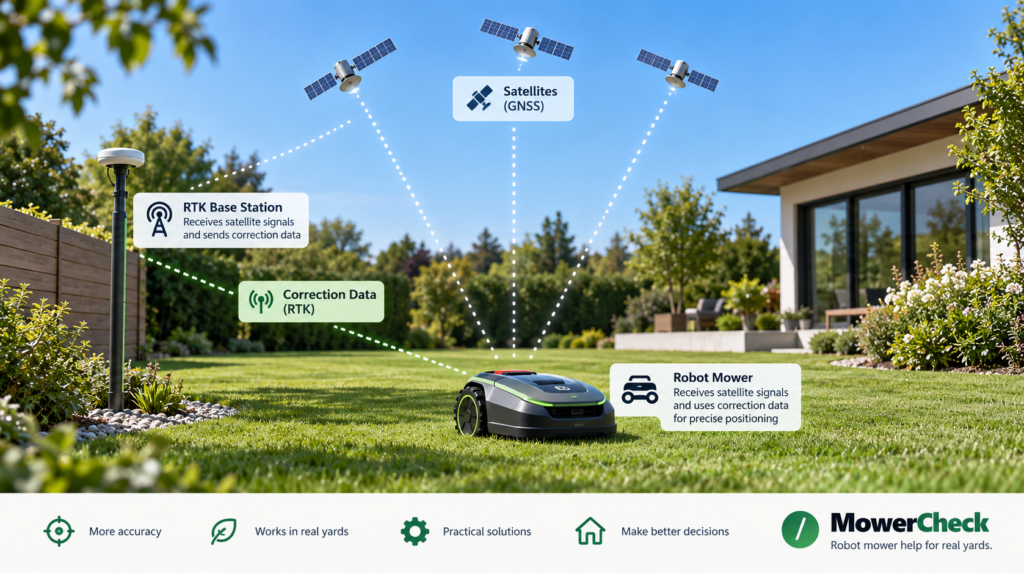
A robot mower that keeps losing RTK or GPS positioning does not necessarily have a bad antenna.
The problem may be the mower’s view of the sky, the RTK reference station, the correction-data connection, or simply one difficult part of your yard.
The fastest way to troubleshoot it is to pay attention to where and when the mower loses positioning.
Quick diagnosis
| What you notice | Start by checking |
|---|---|
| Signal is poor across most of the yard | RTK reference station placement or correction connection |
| Signal drops beneath trees | Mower’s satellite visibility |
| Signal drops beside the house or tall fence | Obstructed or reflected satellite signals |
| Problem started after moving the RTK station | Station setup and mapping |
| Problem is worse when trees have full leaves | Seasonal tree canopy |
| Mower shows good satellite reception but still loses RTK positioning | Correction-data connection |
| Network RTK fails intermittently | Internet/cellular correction service |
| Mower struggles mainly near the charging station | Dock location and sky visibility |
If the problem always happens in one specific place, start with that location.
If it happens almost everywhere, inspect the reference station and correction system first.
First: GPS and RTK are not exactly the same thing
People often use “GPS signal” and “RTK signal” interchangeably, but they describe different parts of the positioning system.
GPS is one satellite-navigation system within the broader GNSS family.
RTK—Real-Time Kinematic positioning—uses satellite data plus correction information from a known reference source to improve positioning accuracy.
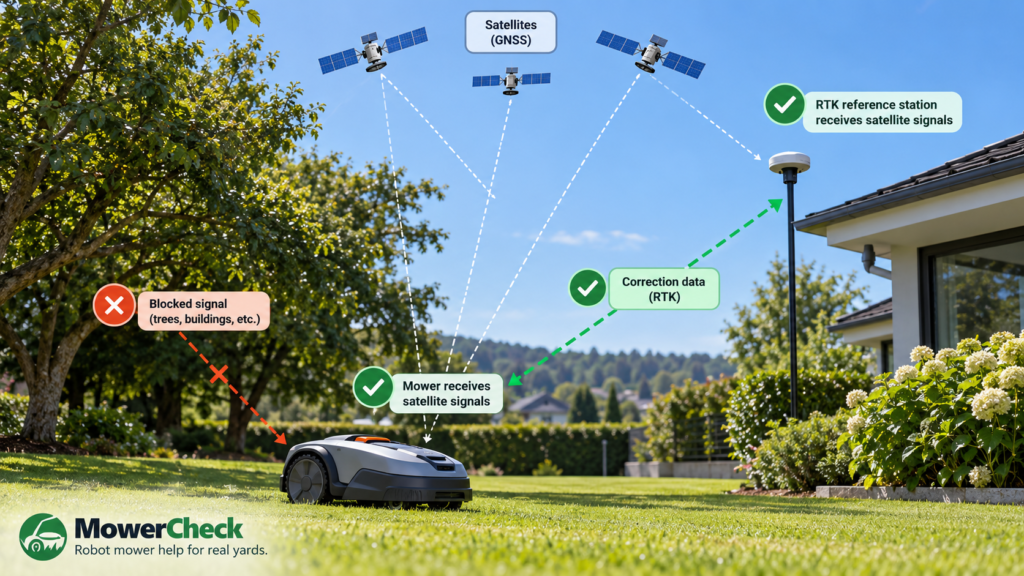
This distinction matters because good satellite reception at the mower does not automatically mean the entire RTK system is working correctly.
Mammotion, for example, separately reports satellite reception for the mower, satellite reception for the RTK reference station, satellites visible to both, signal quality, and the connection to the reference station.
So don’t immediately move the antenna every time you see a positioning error.
First identify which part of the chain is failing.
1. Test whether the problem follows a location
Test
Note exactly where the mower loses positioning.
Does it happen:
- beneath a large tree?
- along one side of the house?
- beside a shed?
- between two buildings?
- in a narrow side yard?
- near a tall privacy fence?
- only at the charging station?
- everywhere?
If possible, move or manually drive the mower from the problem area into a wide-open part of the lawn.
Give it a clear view of the sky and wait for its positioning status to recover.
Solution
If positioning quickly returns in the open lawn, the mower itself is probably capable of receiving a usable signal.
That strongly suggests a yard-location problem rather than a yard-wide RTK failure.
Tall buildings and dense tree crowns can block satellite signals. Husqvarna specifically warns that tall buildings and dense trees with wide crowns can cause poor satellite coverage.
Related guide:
Robot Mower Loses Signal Under Trees: What Actually Helps?
2. Check the mower’s view of the sky
A perfectly positioned RTK base station cannot completely compensate for a mower that cannot see enough usable satellites.
Test
Look upward from approximately where the mower is sitting when it fails.
Ask:
- Is the mower directly beneath dense branches?
- Is a house blocking much of the sky?
- Is it between tall walls?
- Is it underneath a deck, roof overhang, pergola, or carport?
- Is the problem area a narrow passage with tall obstacles on both sides?
Don’t look only at whether some sky is visible.
Satellite positioning benefits from useful signals coming from multiple directions.
Solution
If possible:
- move the mowing boundary slightly away from tall structures
- create a no-go zone around a particularly difficult obstacle
- avoid routing narrow passages directly underneath dense canopy
- give the mower more open sky around problem corners
Manufacturer behavior varies, so don’t assume every RTK mower handles weak-signal areas the same way.
For example, some current Husqvarna systems can use EPOS Support by Wire in selected weak-satellite areas, while newer models with AI vision may use camera-based backup navigation instead.
This is one reason navigation technology matters as much as acreage when choosing a robot mower.
3. Inspect the RTK reference station
If the mower loses positioning across large parts of the yard rather than one isolated area, inspect the reference station.
Test
Look at the station’s surroundings.
Check for:
- trees above or beside it
- roof overhangs
- nearby walls
- fences
- nearby buildings
- large metal surfaces
- a location that has become more obstructed since installation
Also check its status in the manufacturer’s app if available.
Solution
Follow your mower manufacturer’s placement requirements rather than applying one universal distance to every brand.
For example, current Navimow guidance calls for its local RTK antenna to have more than a 110° unobstructed sky view and recommends keeping it at least 6.6 ft from walls, dense trees, houses, and fencing.
Mammotion gives different installation guidance and recommends open-sky placement, including positioning the station sufficiently away from walls, roofs, trees, large glass walls, and large metal objects.
That’s why MowerCheck will not use one generic “RTK antenna must be X feet away” rule for every mower.
Always verify the requirement for your specific system.
Related guide:
Robot Mower RTK Base Station Placement Guide
4. Don’t confuse the mower signal with the base-station signal
This is one of the easiest troubleshooting mistakes to make.
The mower and reference station both need usable positioning information.
Test
If your mower app exposes detailed positioning information, compare:
Mower satellite quality
versus
Reference-station satellite quality
and, if shown:
Common/co-viewed satellites
Mammotion’s diagnostic interface is a good example: it separately displays satellites seen by the mower, satellites seen by the reference station, satellites seen by both, and the quality of each signal.
Solution
If:
Reference station = poor
but
Mower = good
focus on the reference-station location.
If:
Reference station = good
but
Mower = poor only in one area
focus on the yard obstruction around the mower.
If both are poor, both installation and yard conditions deserve attention.
This is much more useful than randomly rebooting everything.
5. Check the correction-data connection
A mower can receive satellite signals and still fail to achieve precise RTK positioning if it cannot receive the necessary correction data.
There are two broad approaches.
Local RTK
A physical reference station on or near your property sends correction information to the mower.
Network RTK / NRTK
Correction information comes through a network service instead of—or depending on the system, alongside—a local reference setup.
Test
If the app shows good satellite reception but poor RTK positioning, look for a status related to:
- RTK connection
- reference-station connection
- correction data
- network RTK
- NRTK
- cellular connection
- internet connectivity
Solution
For a local reference station, check:
- station power
- antenna/cable connections where applicable
- reference-station status
- distance/obstructions between mower and station
- whether the mower remains paired with the correct station
For network RTK, check:
- service availability in your area
- internet or cellular connectivity
- account/service status
- manufacturer service status where applicable
Navimow explicitly distinguishes this from ordinary GPS reception: weak Wi-Fi or 4G does not directly weaken satellite GPS reception, but internet connectivity can affect Network RTK when the mower cannot receive correction data.
That distinction can save a lot of unnecessary troubleshooting.
6. Check tree canopy—not just tree trunks
Trees are one of the most difficult conditions for satellite-based robot mower navigation because the problem can change throughout the year.
Test
Ask whether the mower:
- worked better before spring leaf-out
- struggles only under dense mature trees
- works beside smaller trees but not under wide crowns
- loses positioning around the same branches every time
A tree doesn’t need to physically touch the mower to matter.
Dense foliage above it can reduce satellite visibility and signal quality.
Mammotion notes that trees, leaves, walls, fences, and other obstacles can weaken satellite signal quality even when the mower can still technically “see” satellites.
Solution
Try an open-sky test first.
If the mower immediately recovers after leaving the canopy, your troubleshooting should focus on navigation under tree cover, not on replacing routers or chargers.
If large portions of the lawn have dense canopy, the more important question may eventually become:
Is an RTK-first navigation system the right architecture for this yard?
That’s where LiDAR, vision, hybrid navigation, or systems with an appropriate fallback become worth investigating.
Coming soon:
RTK vs LiDAR vs Vision Robot Mowers: Which Works Best for Your Yard?
7. Look closely at buildings, fences, and reflective surfaces
Trees aren’t the only problem.
Satellite signals can be obstructed by:
- houses
- garages
- sheds
- tall fences
- retaining walls
- narrow corridors between structures
Some surfaces can also contribute to reflected satellite signals rather than simply blocking them.
Test
If the mower repeatedly loses accuracy along one particular wall or structure, test it several feet farther into the open lawn.
If the problem disappears, the structure is a strong clue.
Solution
Depending on your system, options may include:
- moving a virtual boundary farther from the structure
- increasing passage width
- changing the route
- relocating the charging/docking area
- using an available backup-navigation feature
Avoid changing the entire installation because of one isolated dead spot.
First determine whether the problem is local or system-wide.
8. Check the charging-station area
Poor satellite visibility around the dock can create problems that look like charging or return-home failures.
Test
Watch what happens when the mower approaches or leaves the station.
Does it:
- hesitate near the dock?
- lose positioning just before docking?
- struggle to establish its starting position?
- work normally once it reaches the open lawn?
Solution
Check the manufacturer’s requirements for:
- sky visibility
- clearance
- flatness
- distance from buildings and trees
- docking-point placement
Husqvarna states that an EPOS docking point needs an unimpeded sky view, and poor satellite reception can prevent reliable docking-point creation.
Navimow also publishes specific clearance and sky-view requirements for compatible charging-station installations.
Related guide:
Where to Place a Robot Mower Charging Station
9. Restart and update—but don’t stop there
Software problems do happen.
Test
If the problem appeared suddenly even though nothing in the yard or installation changed:
- check the app for warnings
- check for firmware updates
- safely restart the mower according to its instructions
- restart/reconnect the app if needed
- test the same problem area again
Solution
Install current manufacturer firmware where appropriate.
Navimow specifically recommends checking firmware when positioning problems occur and notes that firmware updates can address bugs affecting mower operation.
But don’t repeatedly reboot a mower that fails in exactly the same physical location every day.
Consistent location-specific failure usually points toward the environment or installation.
10. Did you move the RTK reference station?
Treat this carefully.
Some RTK systems build their map relative to a fixed reference position.
Test
Ask:
Did the problem begin after the RTK station was moved, replaced, or remounted?
Even a change that seems harmless may affect the stored map depending on the system.
Solution
Check your manufacturer’s instructions before moving or remounting an RTK reference station.
Do not assume you can move it and continue using the existing map.
Some systems require recalibration or remapping after the reference position changes.
Mammotion, for example, states for relevant LUBA systems that moving the RTK reference station can require the existing map to be recreated because the map is based on the station’s physical position.
This is model-specific, so verify the instructions for your mower.
A useful troubleshooting order
Instead of changing five things at once, use this order:
1. Identify where the failure occurs
One spot or everywhere?
2. Move the mower into open sky
Does positioning recover?
3. Check mower satellite status
Poor or good?
4. Check reference-station status
Poor or good?
5. Check correction connection
Local RTK or network RTK?
6. Inspect trees and buildings
Does the physical environment explain the pattern?
7. Check dock/base placement
Especially if problems happen around charging.
8. Check firmware and restart
Useful for sudden unexplained problems.
9. Change installation only after identifying the weak link
Don’t move the reference station blindly.
Common mistakes to avoid
Assuming Wi-Fi is GPS
Weak home Wi-Fi doesn’t automatically mean weak satellite reception.
Network-based correction services can depend on connectivity, but the two signals are not the same.
Looking only at the RTK antenna
The mower itself also needs usable positioning conditions.
A perfect base station cannot remove every satellite shadow underneath dense trees.
Moving the reference station immediately
That may create more work and, depending on the system, may require remapping.
Testing several fixes at once
If you move the station, change the map, update firmware, and relocate the dock simultaneously, you won’t know what fixed the problem.
Change one variable at a time.
Assuming all RTK mowers behave the same way
They don’t.
Different systems use different combinations of:
- local RTK
- network RTK
- cameras
- inertial sensors
- odometry
- support wires
- LiDAR
- other fallback-navigation methods
Always check instructions for the specific mower.
When the problem may be your yard—not the installation
A few weak-signal spots do not automatically mean you bought the wrong mower.
But if large portions of your mowable lawn have:
- dense mature tree canopy
- tall buildings close to the lawn
- long narrow corridors
- poor sky visibility
- multiple heavily obstructed zones
and your mower repeatedly cannot maintain positioning after the installation has been optimized, the issue may be navigation fit rather than setup.
At that point, don’t simply shop for “stronger RTK.”
Instead, compare how different navigation systems handle your particular yard.
Next guide:
RTK vs LiDAR vs Vision Robot Mowers: Which Works Best for Your Yard?
And eventually:
Best Robot Lawn Mowers for Yards With Trees
This is where replacing a mower may make sense—but only after the fixable causes have been ruled out.
When to contact the manufacturer or dealer
Contact support if:
- the mower reports no satellite reception even in a clear open area
- the reference station has no power or shows an unexplained fault
- the mower cannot connect to a properly installed reference station
- positioning suddenly fails throughout the entire property
- hardware appears damaged
- water has entered an electronic component
- the app reports persistent positioning errors after basic troubleshooting
- you need to relocate hardware but aren’t sure whether the map must be rebuilt
Before contacting support, gather:
- exact mower model
- firmware version
- screenshots of positioning status
- the exact location where the problem occurs
- photos showing the surrounding trees/buildings
- relevant app logs if your manufacturer supports them
This can make diagnosis much faster.
Safety note
Do not climb onto a roof or make unsafe ladder installations simply to improve RTK reception.
If your manufacturer’s preferred antenna position requires roof or high-wall installation, use appropriate mounting equipment and professional help where necessary.
Do not open sealed mower, charging-station, or reference-station electronics to troubleshoot a signal issue.
FAQ
Why does my robot mower keep losing RTK signal?
Common causes include poor satellite visibility around the mower, poor reference-station placement, trees or buildings blocking signals, problems with the correction-data connection, or installation/setup issues.
The location of the failure is often the best first clue.
Can trees block a robot mower’s GPS signal?
Yes. Dense tree crowns and foliage can reduce satellite visibility and signal quality. Current Husqvarna and Mammotion guidance both recognize dense trees as a potential cause of weak satellite positioning.
Does the robot mower need line of sight to the RTK base station?
Not necessarily.
This depends on how the specific mower sends correction data. Satellite visibility and communication with the reference station are separate issues.
For example, Mammotion states that compatible LUBA systems do not require direct line of sight from every lawn location to the RTK reference station, although both the mower and reference station still require suitable satellite reception.
Does weak Wi-Fi cause weak GPS?
Not directly.
Wi-Fi and satellite positioning are different systems. However, a mower using Network RTK may need internet connectivity to receive correction data.
Should I move my RTK base station if the mower loses signal?
Not immediately.
First determine whether the base station itself has poor reception or whether the mower loses reception only in one part of the yard. Moving a reference station unnecessarily can require recalibration or remapping on some systems.
Why does my mower lose positioning only near my house?
The building may be reducing the mower’s view of the sky or affecting satellite signal quality. Test the mower farther into an open part of the lawn. If positioning returns, the location around the building is likely involved.
Is LiDAR better than RTK under trees?
Not universally.
LiDAR does not depend on satellite reception in the same way RTK does, which can be advantageous in some heavily obstructed yards. But mower performance also depends on the complete navigation system, terrain, obstacle handling, mapping, and product implementation.
We’ll cover this separately in our RTK vs LiDAR vs Vision guide.
Final checklist
If your robot mower keeps losing RTK or GPS positioning:
- Note exactly where the failure happens
- Test the mower in an open-sky area
- Check mower satellite quality
- Check RTK reference-station satellite quality
- Check the RTK/correction connection
- Inspect nearby trees and buildings
- Check charging-station placement
- Check firmware
- Don’t move the RTK station until you understand the consequences
- Contact support if positioning fails even under good conditions
The most important rule is simple:
Find which part of the positioning chain is failing before changing the installation.