
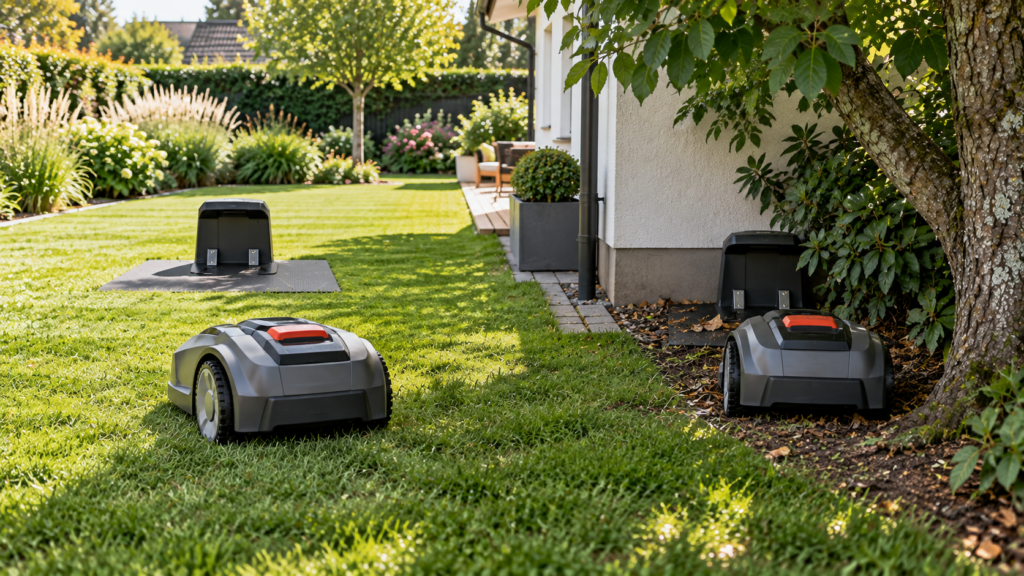
Robot mower charging-station placement affects much more than where the mower gets power.
A poor location can cause:
- failed docking
- repeated return-home problems
- weak RTK/GPS positioning
- boundary-signal issues
- wheel slip
- charging-contact problems
- unnecessary track marks around the dock
The best location is not simply the closest spot to an outdoor outlet.
It should give the mower a stable, level approach, enough open space to dock, reliable navigation, and safe access to power.
Quick answer: what makes a good charging-station location?
| Factor | What to look for |
|---|---|
| Ground | Flat, firm and stable |
| Approach | Clear path with enough room for docking |
| Trees/buildings | Avoid unnecessary obstruction around navigation-dependent systems |
| Power | Reachable with the manufacturer’s approved power setup |
| Water | Good drainage; avoid low spots that collect water |
| Route home | Easy access from all mowing zones |
| RTK/GNSS | Clear sky around docking point where required |
| Boundary-wire systems | Correct wire/guide-wire geometry |
| Metal | Avoid problematic metal objects where manufacturer warns against them |
| Cover | Use only if clearance, ventilation and navigation remain suitable |
There is no universal clearance number for every robot mower.
Manufacturer requirements differ significantly.
For example, Husqvarna currently recommends at least 20 ft of open space in front of the charging station for applicable EPOS docking points, while its physical boundary-wire installations use different front and side clearances. Navimow publishes different values again for applicable systems.
The correct approach is:
Use universal placement principles, then verify the exact measurements for your mower.
1. Start with flat, stable ground
The charging station should sit level.
This sounds simple, but an uneven base can cause the mower to:
- approach at the wrong angle
- miss the charging contacts
- shift the station during docking
- repeatedly enter and back out
- fail to charge even after finding the dock
WORX specifically recommends using a level when a Landroid cannot dock correctly because an uneven charging station can move during docking.
Navimow similarly recommends a flat, even surface for applicable charging stations.
Good surfaces
Depending on the manufacturer’s instructions:
- firm lawn
- properly prepared soil
- stable paving
- manufacturer-approved mounting surface
Poor surfaces
Avoid:
- steep inclines
- loose soil
- deep mulch
- unstable gravel
- exposed tree roots
- depressions that hold water
The mower should enter the station without climbing, twisting or dropping into it.
2. Give the mower enough room to approach
The mower usually needs more space than the physical charging station itself.
Its final approach may require:
- alignment
- turning
- reversing
- following a guide path
- acquiring a docking signal
A dock squeezed between a wall, hedge and planter may technically fit but still be a poor operational location.
Manufacturer examples
For current applicable Navimow installations, Segway publishes approximately:
- 6.5 ft clear in front
- 1.6 ft on each side
around the charging station.
For Husqvarna Automower with a physical boundary wire, current US guidance recommends:
- at least 10 ft in front
- approximately 60 in. to each side of the center
- approximately 2 ft behind
for applicable installations.
For Husqvarna EPOS installations, the requirements are different again.
That is why MowerCheck should never publish:
“Every robot mower needs exactly X feet around the charger.”
Use the specifications for the actual mower.
3. Satellite-based systems may need clear sky around the docking point
This is especially important for RTK/GNSS mowers.
Some systems use a precise virtual docking point near the charging station.
If that point sits underneath dense trees or immediately beside a tall building, the mower may struggle to establish the position needed to dock reliably.
Husqvarna says current EPOS docking points should have an unimpeded view of the sky and recommends at least 20 ft of open space in front of the charging station for applicable installations.
Dense trees and buildings can prevent the mower from establishing a reliable docking point.
Practical test
Stand where the mower would stop just before docking.
Look upward.
If much of the sky is blocked by:
- the house
- large branches
- a garage
- tall fencing
- another structure
the location deserves extra scrutiny if your mower depends heavily on satellite positioning.
4. Do not confuse charging-station placement with RTK base-station placement
These are different pieces of hardware with different jobs.
The charging station:
- charges the mower
- receives the mower
- may provide docking or wire signals
The RTK reference station:
- receives satellite signals
- supplies correction data for precise positioning
They do not necessarily need to occupy the same place.
A spot beside your garage may be convenient for charging but poor for an RTK antenna.
Conversely, a perfect RTK antenna position in the middle of the property may make no sense as a charging location.
For RTK antenna placement, use:
Robot Mower RTK Base Station Placement Guide
5. Trees can cause two different problems
Trees near the charging station matter for two separate reasons.
Problem A: physical obstruction
Branches, roots and vegetation can interfere with:
- docking
- turning
- sensor visibility
- wheel traction
Problem B: navigation obstruction
Dense canopy can reduce GNSS/RTK positioning quality for satellite-dependent systems.
Current Husqvarna EPOS guidance specifically identifies dense tree cover as a possible satellite obstruction.
Navimow’s current applicable installation guidance also recommends keeping the charging station away from dense trees and similar structures.
MowerCheck rule
A tree near the station is not automatically a problem.
Ask:
Does it obstruct the physical approach, the mower’s sensors, or the navigation system?
6. Houses and walls can be convenient—but technically difficult
Many homeowners naturally want the station beside the house because:
- power is nearby
- the mower is less visible
- cable routing is easier
- the station gets some weather protection
That may work perfectly.
But for satellite-positioned systems, a tall wall can block a large portion of the sky.
Husqvarna even recommends adjusting the EPOS docking-point distance when a station sits close to a wall so the mower can reach a location with better satellite visibility before calculating its position.
So:
beside the house
is neither automatically good nor automatically bad.
The exact navigation system matters.
7. Don’t put the dock in a narrow dead-end corner
Imagine this setup:
house wall
↓
charging station
↓
hedge
↓
garden bed
There may be enough physical room for the mower itself, but not enough space for reliable alignment.
This becomes particularly risky if the mower also needs:
- clear satellite visibility
- camera visibility
- LiDAR geometry
- guide-wire approach
A more open approach often makes docking much easier.
If you currently have a mower that cannot return reliably, see:
Robot Mower Won’t Return to the Charging Station: Causes & Fixes
8. Think about access from every mowing zone
The best station location should work with the entire yard, not only the nearest lawn.
Suppose you have:
front lawn
back lawn
side passage
The mower still needs a valid route between those areas and the charger.
Depending on the mower, that route may be defined by:
- a boundary wire
- guide wire
- transport path
- channel
- virtual corridor
- mapped navigation
If the charging station sits in a location that is difficult to reach from one zone, the mower may need manual transport even though the charger itself is installed perfectly.
So ask:
Can the mower reach this point from every area it is expected to mow?
before fixing the station permanently.
9. The station should not sit on a steep slope
A slope can affect:
- docking alignment
- traction
- charging-contact pressure
- drainage
- long-term station stability
Husqvarna’s current general placement guidance says the charging station should be on a level surface.
Navimow likewise recommends a plain, even surface.
If your entire lawn slopes, find the flattest practical location rather than allowing the mower to dock uphill or sideways across the slope.
10. Consider drainage
The station is outdoor equipment, but that doesn’t mean a low spot that collects water is a good location.
Avoid positions where:
- runoff collects after rain
- irrigation sprays directly onto electrical connections
- soil regularly becomes muddy
- leaves block drainage around the base
A slightly higher, well-drained location can reduce:
- mud buildup
- wheel slip
- charging-contact contamination
- erosion under the base
Follow the manufacturer’s weather and electrical-installation requirements.
11. Keep reliable power access in mind
A perfect navigation location is useless if you cannot safely power the station.
Use only:
- approved power supplies
- manufacturer-compatible low-voltage cables
- outdoor-rated connections as specified
Do not create improvised electrical extensions just to reach an otherwise attractive location.
Husqvarna’s current guidance recommends installing the station near an appropriate power outlet.
Ideally, find a compromise where:
navigation + docking + power
all work well.
12. Wi-Fi may matter for some systems
Not every robot mower requires Wi-Fi at the charging station.
But some connected or cloud-dependent systems benefit from—or require—coverage there.
Husqvarna notes that Wi-Fi-only Automower models using EPOS through the Husqvarna Cloud need stable Wi-Fi coverage around the charging station and throughout the work area.
Other systems may use:
- cellular service
- Bluetooth
- local RTK
- no continuous internet connection
So don’t blindly put the charging station beside the router.
Instead ask:
Does my mower actually depend on connectivity here?
13. Metal objects can matter
Some robot mower charging and navigation systems can be affected by nearby metal.
Current Husqvarna guidance warns against metal objects near the station, including:
- reinforcement bars
- metal edging
- coils of low-voltage cable
because they can interfere with charging-station signals.
For relevant EPOS systems, Husqvarna also warns about metal fences interfering with communication.
So be cautious about placing a station:
- directly beside a large metal fence
- next to a sheet-metal shed
- over reinforced structures without checking manufacturer guidance
- beside coils of unused cable
This is manufacturer-specific, but worth considering.
14. Don’t coil excess low-voltage cable beside the station
This is a small installation mistake that is easy to overlook.
Husqvarna explicitly includes coils of low-voltage cable among metal/electrical configurations that may interfere with the station signal.
If the installation gives you excess cable, route and store it according to the manufacturer’s instructions rather than simply making a tight coil behind the dock.
15. A mower garage or cover can be useful—but check compatibility
A charging-station cover can protect the mower from:
- sun
- rain
- debris
but poorly designed shelters can create other problems.
Husqvarna says its own Automower House is designed around the mower’s operational requirements, while DIY or alternative shelters may interfere with functionality if they restrict clearance, ventilation or signals.
For applicable EPOS installations, Husqvarna says the charging station can be placed under a roof if the docking point itself retains clear sky visibility and the required open space is maintained.
If adding a cover, check
- front clearance
- side clearance
- ventilation
- heat buildup
- drainage
- sensor obstruction
- RTK/GNSS docking-point visibility
- whether metal construction interferes with the system
Do not build a beautiful mower garage that makes docking unreliable.
16. Shade is useful—but don’t sacrifice navigation for it
Protecting the mower from intense sun can help reduce unnecessary heat exposure.
Husqvarna currently recommends placing the charging station somewhere protected from sun where practical or using an appropriate mower house.
But this creates a tradeoff for satellite-dependent systems.
A station deep underneath a mature tree may provide excellent shade while creating a poor docking environment.
The better solution may be:
- an approved mower cover
- partial shade
- a nearby structure that doesn’t obstruct the docking point
- another location with better sky visibility
Optimize the whole system, not only sun protection.
17. Wired and wire-free mowers need different placement thinking
Perimeter-wire system
Placement needs to consider:
- boundary-wire routing
- guide-wire routing
- station signal
- required front and side clearance
- metal interference
RTK/GNSS wire-free system
Placement may additionally require:
- clear sky at the docking point
- correction connectivity
- mapped transport routes
LiDAR/vision system
Placement may depend more heavily on:
- visible environmental features
- obstacle-free approach
- camera/LiDAR visibility
- mapping geometry
This is why one internet article saying:
“Put every charging station beside the house”
is not sufficient guidance anymore.
18. If using perimeter wire, wire geometry matters
On traditional boundary-wire systems, the charging station isn’t just a power source.
It is part of the guidance system.
Husqvarna currently recommends specific clearances and wiring layouts for physical boundary-wire installations and says that an island-mounted station should have its guide wire connected appropriately.
Do not permanently screw down the station until:
- boundary wire is installed
- guide wires are connected
- mower successfully returns
- charging works reliably
Husqvarna specifically recommends verifying the installation before permanently securing the station.
That is good advice for other systems too:
Test before making the location permanent.
19. Test the location from several parts of the yard
Before finalizing a station location, run a simple return-home test.
Send the mower home from:
Test A — nearby
Approximately 10–20 ft away.
This checks the final docking maneuver.
Test B — middle of the lawn
This checks normal return navigation.
Test C — farthest mowing zone
This checks whether the full route is reliable.
Test D — most difficult area
For example:
- behind the house
- under tree canopy
- through a narrow passage
If the mower succeeds consistently from all four locations, you have much more confidence in the installation.
20. Don’t move the station casually after mapping
On modern mapped systems, the station position can be part of the digital installation.
For example, Husqvarna’s current EPOS documentation says changing the docking point requires reinstalling the charging station in the app and generating a new docking point.
Navimow also warns that moving the charging station after setup can prevent reliable return until the installation is corrected.
So once the system is mapped and working:
don’t casually move the station six feet because the patio furniture changed.
Check the relocation procedure first.
Good vs poor charging-station locations
Good candidate
- level ground
- clear approach
- reliable power
- accessible from all zones
- good drainage
- suitable navigation environment
- manufacturer’s clearance requirements met
Poor candidate
- underneath dense canopy on an RTK-dependent system
- beside a tall wall with no usable docking-point sky view
- steep slope
- muddy depression
- narrow dead-end corner
- blocked by plants or planters
- too far from required connectivity
- route home crosses an impossible zone
Common mistakes
Choosing the nearest outlet
Convenient power doesn’t make a good docking location.
Hiding the station behind landscaping
A hidden dock may block sensors, satellite view or approach space.
Using one manufacturer’s clearance numbers for another mower
Different models have different requirements.
Placing it under dense trees for shade
Shade can be useful, but satellite-dependent systems may suffer.
Ignoring the return path
A perfect charging station is useless if the mower cannot reach it.
Installing permanently before testing
Always verify docking and charging first where possible.
What if there is no perfect location?
Many yards require compromise.
Rank your priorities:
1. Reliable docking
The mower has to physically enter and charge.
2. Navigation
The system must know where the station is.
3. Safe power
No improvised outdoor electrical work.
4. Access from mowing zones
It must be reachable.
5. Protection
Shade/cover comes after reliable operation.
A station that is slightly more visible but works every day is better than a beautifully hidden installation that needs manual rescue.
FAQ
Where is the best place for a robot mower charging station?
Usually on a flat, stable surface with enough open space for docking, reliable power, a clear return route and the navigation conditions required by the specific mower.
Can a robot mower charging station go next to a house?
Yes, depending on the mower.
For satellite-based systems, make sure the docking point still has sufficient sky visibility. Other systems may work well beside a house if approach clearance and sensor requirements are met.
Can I put the charging station under a tree?
Possibly, but be careful with satellite-dependent systems.
Dense canopy can weaken GNSS/RTK positioning near the docking point. Trees can also create root, leaf and branch problems.
Does a robot mower charging station need full sun?
No.
In fact, some manufacturers recommend shade or a suitable mower house to reduce long-term sun exposure. But do not create shade in a way that harms navigation or ventilation.
Does the charging station need Wi-Fi?
Not universally.
Some cloud-based navigation or connected models may require Wi-Fi or another network connection. Other mowers can navigate independently.
Check the requirements for your specific model.
Can I put a robot mower charging station on concrete?
Potentially, if the manufacturer supports the installation and the base remains level and correctly secured.
Consider cable routing, station mounting and whether metal reinforcement beneath the surface could matter for the particular system.
How much space does a robot mower need in front of the charging station?
It depends on the model.
Current Husqvarna EPOS guidance calls for about 20 ft for applicable docking points, while applicable Navimow systems use roughly 6.5 ft in front. Physical boundary-wire Husqvarna installations use different dimensions again.
Always use the actual installation manual.
Can I move the charging station later?
Usually yes, but a mapped wire-free system may require updating or reinstalling the station/docking point in the app.
Check the procedure before moving it.
Final charging-station placement checklist
Before permanently installing the dock:
- Ground is flat and stable
- Station cannot rock or sink
- Front approach clearance meets the mower’s requirements
- Side clearance is sufficient
- Docking point has clear sky if required
- Dense trees/buildings have been considered
- Route from every mowing zone is valid
- Power can be supplied safely
- Wi-Fi/cellular connectivity is adequate where required
- Metal interference has been considered
- Drainage is good
- Mower house/cover will not block operation
- Return-home test works from nearby
- Return-home test works from the farthest zone
- Charging contacts align correctly
- Location has been tested before permanent fixing
The best charging-station location is not simply the spot where the mower fits.
It is the location where the mower can:
find it, approach it, dock reliably, charge correctly and leave again without creating a new navigation problem.