
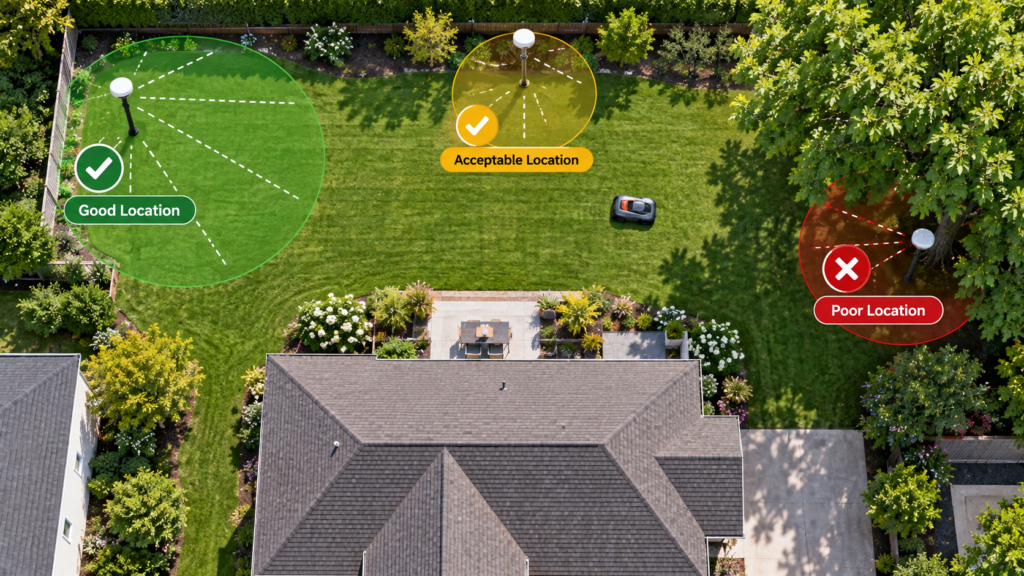
Correct RTK base-station placement can make the difference between a robot mower that holds a stable position across the lawn and one that repeatedly loses accuracy.
But there is no single universal rule such as:
“Put the antenna 10 feet from every tree.”
Different manufacturers use different reference-station hardware, communication methods, mounting requirements, and distance limits.
The better rule is:
Use universal placement principles for the yard, then follow the exact installation numbers for your mower.
Quick answer: where should an RTK base station go?
A good location generally has:
| Requirement | What to look for |
|---|---|
| Sky visibility | Wide, unobstructed view of the sky |
| Trees | No dense canopy immediately above or around the antenna |
| Buildings | Avoid locations boxed in by walls or rooflines |
| Mounting | Firm, upright, and unable to move |
| Metal | Avoid large metal objects that may interfere |
| Communication | Keep within the manufacturer’s supported mower range |
| Power | Reliable power where required |
| Safety | Accessible without unsafe roof or ladder work |
The biggest mistake is choosing the location because it is convenient for power or visually discreet while ignoring satellite visibility.
Why RTK base-station placement matters
A local RTK robot-mower system typically uses two satellite receivers:
the receiver on the mower
and
the receiver at the RTK reference station.
The reference station knows its fixed position and supplies correction information that helps the mower calculate a much more accurate position.
That means a poorly positioned reference station can affect navigation across much more of the property.
But there is an equally important limitation:
A perfect RTK station cannot completely solve poor satellite reception at the mower itself.
If your mower works everywhere except underneath one large tree, moving a correctly installed reference station may not help.
We explain that distinction in:
Robot Mower Losing RTK or GPS Signal? How to Find the Cause
and:
Robot Mower Loses Signal Under Trees? What Actually Helps
1. Prioritize open sky
Sky visibility should usually be your first consideration.
Good locations
Think about locations such as:
an open section of lawn, a suitable pole with unobstructed sky, or a manufacturer-approved wall or roof installation where the antenna sits above surrounding obstacles.
Poor locations
Be cautious about placing a reference station:
under a large tree, beneath a roof overhang, between two buildings, directly beside a tall wall, in a narrow side passage, or underneath dense foliage.
Current Husqvarna guidance for applicable local EPOS reference stations requires a minimum 135-degree clear view of the sky.
Mammotion likewise instructs users to install applicable RTK reference stations in an open area and specifically warns against locations where roofs or trees obstruct satellite reception.
The exact numbers differ, but the principle is consistent:
The reference station needs a strong, stable view of the satellite sky.
2. Look upward from the antenna position
A useful placement test requires more than standing in the yard and deciding that the location “looks open.”
Stand where the top of the antenna will actually be.
Then look upward.
Ask:
How much sky is visible in every direction?
A station beside the house may have completely open sky in front of it while half of the sky behind it is blocked by the roof.
A station beside a mature tree may appear clear at ground level while most of the antenna’s upper view is covered by branches.
This is why viewing the installation from the antenna’s perspective matters.
3. Keep trees away from the reference station
Trees can be problematic because their effect is not limited to the trunk.
The canopy matters too.
A station placed six feet from a tree trunk may still sit almost completely beneath the crown.
Mammotion’s current installation guidance for applicable systems says to avoid roofs and trees that can obstruct satellite signals. One published installation guide also recommends at least 3 meters (10 feet) from a wall or tree for that particular setup.
However, do not turn that 10-foot figure into a universal robot-mower rule.
Other systems use different requirements.
A better MowerCheck rule is:
Keep the station outside significant canopy and follow the clearance specified for your particular mower.
4. Buildings can be just as important as trees
A building blocks a large section of the satellite sky.
Problem locations can include:
between the house and garage, directly beneath an eave, beside a tall exterior wall, behind a shed, or within a narrow courtyard.
For applicable Husqvarna EPOS installations, the reference station must have the required open-sky view and, when wall mounted, the top of the unit should sit above the wall rather than remaining hidden behind it.
Mammotion also explicitly warns against installing applicable stations at the corner of an L-shaped building or along a narrow path between structures.
So simply attaching an antenna to the nearest exterior wall is not automatically a good installation.
5. Height helps—but higher is not always automatically better
Mounting the reference station higher can improve its view over surrounding obstacles.
For applicable Husqvarna local EPOS installations, current guidance requires the reference station to be at least 6.5 ft (2 m) high.
But this does not mean every RTK station should be placed as high as possible.
Manufacturers differ.
The correct installation height depends on:
the hardware, mounting system, communication method, surrounding obstacles, and manufacturer’s instructions.
A safe, stable installation slightly lower is preferable to an unsafe improvised roof installation.
6. Make sure the station cannot move
An RTK reference station represents a known fixed location.
So its mounting should be:
upright, stable, rigid, and resistant to accidental movement.
Mammotion explicitly says applicable RTK reference stations should be positioned vertically and secured stably.
After installation, check whether:
the pole flexes significantly, the ground stake is loose, the wall bracket moves, or landscaping equipment could knock the station.
If you later discover that the station has shifted, don’t simply bend it back and assume the saved map is unaffected.
Check the manufacturer’s instructions first.
7. Pole, wall or roof: which is best?
There isn’t one universally superior mounting method.
Lawn/pole installation
This can be excellent when the property has a genuinely open location.
Advantages include easier installation and maintenance.
The downside is that surrounding vegetation may grow and change the station’s sky view over time.
Wall installation
This can work well when the antenna can be mounted high enough to see over the structure.
For applicable Husqvarna systems, the top of the reference station should sit above the wall when wall mounted.
Roof installation
Roof placement can provide excellent sky visibility and can be useful for complex properties.
Mammotion specifically recommends considering higher wall or roof placement for certain U-shaped, O-shaped, or separated-lawn layouts.
But roof installation introduces safety, cable-routing, lightning/weather, and maintenance considerations.
Do not climb onto a roof just because it appears technically optimal.
Use professional installation where appropriate.
8. Don’t ignore communication range
Satellite reception is only one part of a local RTK installation.
The mower still needs to receive correction information from the reference station.
For applicable Husqvarna EPOS installations, current guidance says the mower should remain within 330 ft (100 m) of the reference station, and obstacles can reduce the practical distance.
Other manufacturers use different communication technologies and limits.
This means a station at the far edge of a very large or complex property might have excellent satellite reception but still create another problem:
poor communication with distant mowing zones.
For a large property, evaluate both:
sky view
and
communication coverage.
9. Is the center of the yard always best?
No.
A central position can sometimes help communication coverage, but satellite visibility is often more important.
Imagine two possible locations:
Location A: center of property but beneath a large oak tree.
Location B: somewhat off-center but with wide open sky.
Location B may be the much better reference-station location.
Don’t optimize one variable while destroying another.
The ideal position balances:
sky visibility + communication + stable mounting + practical installation.
10. Watch out for large metal objects
Large metal structures may interfere with parts of a robot-mower installation.
Current Husqvarna EPOS guidance specifically recommends checking for metal objects such as metal fences when troubleshooting reference-station communication.
Mammotion’s published guidance for applicable systems recommends keeping the station at least 5 m away from large glass walls or large metal objects such as sheet-metal walls.
Potential trouble spots include:
metal sheds, large metal fences, metal wall panels, and other substantial conductive structures.
Again, those exact distances are manufacturer-specific.
11. Don’t forget large glass surfaces
This is easier to overlook.
Mammotion includes large glass walls among the objects it recommends avoiding around applicable RTK reference-station installations.
So a modern house with a large glass facade should not automatically be treated as an invisible obstacle.
If you have a choice between:
a station immediately beside large glass/metal surfaces
and
a clean open-lawn position,
the open installation deserves serious consideration.
12. The charging station and RTK station are different
This causes a surprising amount of confusion.
The RTK reference station helps provide positioning correction.
The charging station charges and docks the mower.
They may be physically connected or positioned near each other on some systems, but they solve different problems.
A location can therefore be good for one and bad for the other.
For example, the charging station may be conveniently placed beside a garage wall, while the RTK antenna requires much better sky visibility.
Do not assume they must always occupy exactly the same location.
Follow the installation architecture of your particular mower.
13. The dock itself may also need clear sky
With some satellite-based systems, docking also depends on positioning.
Current Husqvarna EPOS guidance requires the docking point to have a clear sky view and recommends at least 20 ft (6 m) of free space in front of the charging station for applicable installations.
This creates an important distinction:
You can have a perfectly positioned RTK reference station…
but a badly positioned charging station.
Then the mower might navigate the lawn correctly but struggle to leave or return to the dock.
If that’s your problem, read our upcoming charging-station placement guide rather than moving the RTK station.
14. Consider the shape of the yard
Large, separated or unusual properties can make reference-station placement more complicated.
Mammotion’s current installation documentation specifically discusses L-shaped, U-shaped, O-shaped, and separated lawns.
For certain U-shaped, O-shaped, and multiple-lawn layouts, Mammotion recommends higher wall or roof placement for its applicable RTK hardware.
That doesn’t mean every unusual lawn requires a roof installation.
It demonstrates why:
yard geometry should be considered along with satellite reception.
A reference station that works beautifully for a rectangular suburban yard may not be ideal for a property wrapping around a house.
15. Don’t hide the antenna for appearance
This is a practical mistake worth avoiding.
Homeowners understandably want the RTK station to be unobtrusive.
That can lead to placing it:
behind a hedge, beneath a tree, beside the shed, below the roofline, or between decorative landscaping.
Unfortunately, the most visually hidden location may be the worst technical location.
The station doesn’t need to dominate the landscape, but function should come before concealment.
You can improve appearance later with careful placement that does not obstruct the sky.
16. Think about how the yard will change
A location that looks perfect during installation may not stay perfect.
Consider:
tree growth
spring/summer foliage
hedges becoming taller
new sheds or structures
new fencing
garden renovations
If the antenna sits barely outside today’s tree canopy, it may end up beneath next year’s canopy.
Where practical, leave some margin rather than selecting a location that is only just acceptable.
17. Don’t move the reference station casually after mapping
This is extremely important.
On some robot-mower systems, the virtual map depends on the fixed physical position of the reference station.
Moving it after mapping can therefore affect previously stored boundaries and work areas.
Husqvarna’s current EPOS documentation says that moving the reference station to a new location may require creating a new EPOS installation and recreating work areas, stay-out zones, and transport paths.
So before moving a station:
check the manual, determine whether recalibration or remapping is required, and document your current setup.
Do not casually relocate it as a troubleshooting experiment.
18. Test the location before making installation permanent
When your mower/system allows it, validate the candidate location before committing to difficult permanent mounting.
Check:
reference-station status
satellite reception
mower communication
coverage in distant zones
problem areas
Then run the mower around the property.
A theoretical “perfect” antenna location is less useful than one that performs reliably in the actual yard.
Brand-specific examples
These examples show why we don’t publish one universal placement number.
| System | Current published example |
|---|---|
| Husqvarna EPOS local reference station | ≥135° clear sky, ≥6.5 ft high, mower generally within 330 ft for applicable installation |
| Mammotion RTK installations | Open sky, upright/stable mounting; applicable documentation includes clearance from trees/walls and warnings about metal/glass |
| Other RTK systems | Follow the exact manual; requirements can differ materially |
Husqvarna requirements cited above come from its current US EPOS support documentation. Mammotion’s examples come from its current official RTK installation documentation.
This is why MowerCheck will distinguish between:
universal yard principles
and
manufacturer-specific specifications.
Common RTK placement mistakes
The most common problems are choosing the station location based only on access to power, putting it beneath tree canopy, mounting it too close to a building without considering sky visibility, hiding it behind landscaping, ignoring communication distance, and moving it after mapping without checking the consequences.
Another major mistake is assuming that moving the station will fix every weak-signal area.
If the mower itself loses satellites underneath a tree, the reference station may already be perfectly installed.
Our separate guide explains what to do in that situation:
Robot Mower Loses Signal Under Trees? What Actually Helps
What if the best RTK location is inconvenient?
Sometimes the technically best location requires:
a long cable route, wall mounting, an additional mounting accessory, or professional installation.
Don’t immediately compromise the signal just because the easiest location is beside the charger.
Instead compare:
Option 1: easy installation + compromised sky
against
Option 2: slightly more work + reliable long-term positioning.
Since the station is part of the mower’s navigation infrastructure, a strong initial installation can prevent repeated troubleshooting later.
Safety
Do not use an unstable ladder, climb onto a wet roof, or improvise unsafe high mounting just to improve satellite reception.
Use manufacturer-approved brackets and mounting hardware.
For high wall or roof installations, professional installation may be the safer option.
Keep electrical connections and power supplies installed according to the manufacturer’s outdoor-use instructions.
FAQ
Where is the best place to put an RTK base station?
Usually somewhere with a wide open view of the sky, stable mounting, minimal nearby obstructions, and reliable communication with the mower.
The exact height and clearance requirements depend on the manufacturer.
Can I put an RTK station under a tree?
Generally, that is a poor location because branches and foliage can obstruct satellite reception.
Both Husqvarna and Mammotion specifically emphasize open-sky placement in their current guidance.
Does an RTK base station need line of sight to the mower?
Not universally.
Communication architecture differs between systems. Do not assume that direct visual line of sight is required unless your manufacturer specifies it.
What is generally important is that the reference station itself has suitable satellite reception and that the mower remains within the supported correction-data communication environment.
How high should an RTK station be?
There is no universal height.
For example, current Husqvarna guidance for applicable local EPOS installations specifies at least 6.5 ft (2 m).
Other products may have different requirements.
Can I mount the RTK antenna on my roof?
Some manufacturers support roof installation, and it can provide excellent satellite visibility.
Mammotion explicitly supports appropriate wall/roof installations for applicable systems.
However, use approved mounting hardware and prioritize installation safety.
Can I move the RTK station later?
Possibly, but check the mower’s instructions first.
Moving the reference position may require recalibration or recreating the map on some systems.
Should the RTK station be next to the charging station?
Not necessarily.
Their functions are different, and the optimal location for the charging station may not provide the best satellite view for the reference station.
Follow the architecture and installation instructions for your particular mower.
Final placement checklist
Before permanently mounting an RTK reference station, confirm:
- Wide, unobstructed sky view
- No dense canopy directly above it
- Adequate clearance from buildings
- Manufacturer-specific mounting height met
- Station is upright and stable
- Large metal/glass obstacles considered
- Mower remains within supported communication range
- Power/cable routing is practical
- Charging-station requirements considered separately
- Seasonal tree growth won’t immediately obstruct the station
- Relocation/remapping consequences are understood
- Installation can be completed safely
The best location isn’t necessarily the highest, closest, or most central.
It’s the location that gives the specific RTK system a stable reference position, strong satellite visibility, reliable communication, and a safe permanent installation.